In the earlier styles of computer instruction, the interpretation process could only translate your command into one possible outcome. It was like a dictionary with a single definition for each word. With an LLM, the computer is a dictionary with an indeterminate number of definitions for every input.
Spencer traces the LLM through a lineage of computer language, from machine code to assembly and up the ladder of abstraction.
Programmers and computer scientists have been climbing that ladder for decades to amp up the expressivity of the machine and allow us to encode more and more complex decisions with less effort from humans. All the while holding on to determinism and control: the steady beat.
I find it disorienting and magical that setting aside that need for perfect control has allowed us to not just step up the ladder, but to jump up a dozen rungs at once (Dijkstra be damned).
There’s a lot to be learned from musicians like Spencer about computing, because music is a domain where both structure and the breaking of structure are appreciated. Computerized drum machines became trusted tools because they delivered perfect time, and then great producers came along and showed us the value of adding a little human wonkiness back in.
For those of us making creative things with computers and trying to incorporate LLMs, the skill now is knowing when to play on the beat and when to play behind it.
Although I’m generally allergic to dependencies as a programmer, I occasionally stumble upon a package that 1) does a thing I really wouldn’t want to implement myself, and 2) is obviously well crafted and likely to be reliable and well maintained. Having great tools in your back pocket, waiting to be leveraged when needed, is a superpower.
So here’s one such tool: @pierre/diffs, available at diffs.com (what a domain name!), is a package for rendering really nice file diffs. And although it comes with a React component, it also has a vanilla JavaScript API as well which is most appreciated.
I used this package in a tool I’ve been building recently, and I was delighted at how simple it was to integrate, and how it respected the existing typography styles in my project.
In a different universe we might have primitives such as this baked into the web platform, but short of that it’s nice to know there’s a well-built tool for this that we can all use. Thanks, Pierre!
Sunday Robotics designed and developed their new robot, Memo, and the platform for training it in stealth over the past two years. No hype events, no prototypes being operated remotely by humans, no promises to change the world. Sunday seems happy to let the result of the work stand for itself: the company’s first tweet was posted just this month! In an age of endless and often fraud-adjacent hype, quiet competence is a refreshing vibe.
Memo’s form is unique: a friendly, cartoonish-yet-anthropomorphic upper half connected via telescoping rod to a wheeled, rectangular base. Many robotics companies attempt to mimic the human body and in doing so adopt the limitations that come with it. Memo is not bipedal, but in return it has gained the ability to grow and shrink to reach farther than a human could.
Another side effect of this design is that Memo is never at risk of falling over and hurting someone if it loses power unexpectedly or malfunctions. Sunday calls this feature “passive stability” and, simple enough though it may seem, feels pretty important when considering the practical matter of having a robot moving around your home.
On the Star Wars/Trek spectrum, Memo falls farther towards the Trek end than many other home robots I’ve seen. That is a very big complement!
Perhaps a more apt comparison would be Nintendo vs. Sony. Memo could have been plucked right out of a Super Mario game.
Memo’s physical form is so well crafted that many of the videos of it in action appear to be CGI renders. Sunday assures that they are real, uncut videos, but suspicion comes with the territory these days.
The best part of the whole thing might just be that you can change Memo’s hat. Visitors to Sunday’s website can even vote for new hat styles (bucket hat has my vote). Because what is the point of owning a robot if you can’t accessorize it?
Sunday has taken a unique approach to training Memo: human beings wear gloves while performing tasks that restrict their motion to only that of which the robot is capable. Sunday calls these humans “Memory Developers.”
This training strategy can be contrasted with the approach taken by many of Sunday’s competitors, which is to gather training data via humans operating the robots remotely. But this misses many of the subtleties of how humans actually move. Watching Memo handling delicate stemware makes it clear how the quality of training data translates to real-world performance. There’s an awkwardness in the movement of other home robots which Memo seems to largely avoid.
The brim of Memo’s hat cleverly houses a downward looking camera for capturing the bot’s field of view. This mirrors the headset mounted camera that memory developers wear in addition to the training gloves.
Once again we are reminded that the most valuable resource of the AI era, the resource in increasingly short supply, is data generated by the unique experiences of humans. According to Sunday, the going rate for a memory developer is around $60 an hour.
The idea of “memory development” as a career is straight out of science fiction (looking at you, Blade Runner 2049) and yet, here it is, in 2025, arriving without us ever really noticing. The future can be awfully sneaky.
Something I’m noticing about AI, or at least this moment of AI agents and tools for building software, is the extreme amount of fiddling they invite. Fiddling here includes things like trying new models and tools, tweaking prompts, leveraging MCP servers vs. code tools, browsing plugins, installing skills, configuring hooks, setting up subagents, and the list goes on.
The specific knobs you can fiddle vary from tool to tool, but their existence and multitude are hard to avoid. And knobs aren’t even quite the right metaphor here, as turning a knob in the real world tends to have a deterministic effect.
Fiddling with AI can feel like turning knobs on a synthesizer that interprets your choices as suggestions rather than commands.
Take this article by Shrivu Shankar about how they make use of the litany of Claude Code’s features. There’s a lot of helpful stuff in here to be sure, but my biggest takeaway is the sense that the configuration surface is so large, the knobs to turn so numerous, and the interplay between those knobs so mysterious that I could spend an eternity optimizing my setup without ever knowing if the result was meaningfully better or worse.
Then you add on the fact that large language models and the tooling build on top of them is changing rapidly. How is a person who wants to effectively use the best available tools expected to possibly keep up?
Frank Chimero’s recent essay Beyond the Machine reframes this whole dynamic by casting AI as an instrument instead of a tool—something that is not just used but played.
In other words, instruments can surprise you with what they offer, but they are not automatic. In the end, they require a touch. You use a tool, but you play an instrument. It’s a more expansive way of doing, and the doing of it all is important, because that’s where you develop the instincts for excellence. There is no purpose to better machines if they do not also produce better humans.
Instruments also invite fiddling. There are many aspiring musicians who struggle to move beyond endless tweaking, tuning, collecting, or customizing to actually make a tune.
Yet successful musicians fiddle too—maybe even more. Perhaps the trick is knowing when to fiddle and when to play, and recognizing that sometimes those are one and the same.
What I need you to understand is that nobody is letting them go quietly. The Feds’ every movement is announced by a chorus of whistles, by a parade of cars honking in their wake, neighbors rushing outside to yell to film to witness these kidnappings that are unfolding in front of us. Neighbors running towards trouble.
Don’t miss the resources at the end of Dan’s post about how to contribute your time and/or money. Chicago has always been a bellwether for the country: of dangers to come and hope to be found.
The more I use Claude Code, the more I find it useful and interesting for tasks beyond the one for which it is named. Simon Willison agrees:
Claude Code is, with hindsight, poorly named. It’s not purely a coding tool: it’s a tool for general computer automation. Anything you can achieve by typing commands into a computer is something that can now be automated by Claude Code. It’s best described as a general agent.
On one hand it’s surprising that this sort of tool is taking the form of a command line interface in the year 2025, but it also makes a lot of sense: CLIs provide programmatic access to your machine and are easy to distribute across platforms.
I often think of the web as the world’s great distribution mechanism (along with the post office), but it lacks the ability to interface with anything outside the browser. This is largely by design and in most cases a helpful feature! But it certainly limits the power of any general purpose agent distributed as a web app.
Native apps have capabilities beyond the browser, but are harder to build and distribute across platforms. That said, I’m excited to see AI companies invest in more general purpose computing agents via native OS integrations. OpenAI’s recent acquisition of Sky is certainly something to keep an eye on.
An irony of the personal computing revolution is that, while everyone has a supercomputer in their pocket, a majority of our actual computing has moved to machines in the cloud that we neither own or control.
This surely has some benefits: apps and data are available anywhere and instantly in sync across devices, users are less likely to lose any of their data if their physical device is lost or damaged, and consumers don’t have to worry about the maintenance and upkeep of complicated software.
I’ve written before about the importance of taking ownership of our digital lives. There is indeed a power waiting to be claimed by those who are willing to trade some of those aforementioned benefits for a computing environment that they control.
The web browser is something of a great equalizer here: a universal surface for running and accessing software on any device; the stability of the platform and the ubiquity of its distribution mechanism is unrivaled by the postal service alone. You would expect, then, that the web would be the perfect platform for private, personal software that is owned and controlled by individuals. Unfortunately, that’s often not the case!
Running personal software on the web is a trade off between privacy and ownership. Don’t want anyone to access your private data? You’ll need to implement some sort of authorization scheme and security mechanisms to ensure your data is only accessible to those you trust. Don’t want to manage all of that yourself? Then you’ll need to use a platform owned by someone else that does it for you.
Why is it so hard to scale down on the web? What if there were a better middle ground? Well, dear reader, I’m here to tell you that I’ve found one.
Imagine: a computer you own, connected to a private cloud, accessible anywhere (for free!), running software on your behalf. All of this is easier than it sounds to setup and maintain if you use the right tools. In this piece I want to share how I’ve set this up for myself using a spare Mac mini.
Set up automations to organize emails, files, and more.
Serve as a Time Machine backup destination.
Run your own local LLMs or MCP servers to plug into other AI tools.
Have access to a full computing environment on the go from a tablet or smartphone.
Anything else you might dream of doing with a computer that’s always on and available.
Hardware wise there are lots of options for hosting your own cloud computer, but I happen to think Apple’s latest M4 Mac mini is a superb choice, especially if you’re already familiar with MacOS. It’s shockingly small, whisper silent, plenty powerful, and well priced at a starting point of $599.
This guide will focus on how you can take an off the shelf Mac mini (or really any Mac)and run your own web software that is accessible through a web browser to you and you alone. We’ll make use of just a few free-to-use dependencies.
Configure your Mac
Running a Mac mini as a headless server means we won’t have it connected to a display or keyboard during normal operations. You will, however, need to connect those accessories for these initial steps to set up remote access. I’ve outlined the steps below, and once you have these settings configured you can disconnect the monitor and keyboard permanently.
It’s worth noting that as a side effect of making your Mac remotely accessible we’ll need to change some settings that make your machine less secure to anyone who is able to access it physically. Be sure your device is kept somewhere secure and can’t be accessed by any bad actors.
Turn on remote management and login
Before we enable the ability to access our cloud computer from outside our home network, we first want to set up local remote access so that we can connect to the Mac mini from other devices.
Navigate to System Settings → General → Sharing
Toggle on File Sharing, Remote Management, Remote Login, and Remote Application Scripting.
Startup automatically after a power failure
Navigate to System Settings → Energy
Toggle on the following settings:
Prevent automatic sleeping when the display is off
Wake for network access
Start up automatically after a power failure
Automatic login
This makes sure that if the machine reboots it will automatically bypass the user selection screen and log in as whichever user you choose.
Navigate to System Settings → Users & Groups
Select a profile next to “Automatically log in as”
Never require password to log in
Navigate to System Settings → Lock Screen
Select “Never” for “Require password after screen saver begins or display is turned off.”
Select “Never” for “Start Screen Saver when inactive”
Enable file sharing
This allows us to access the filesystem of our Mac mini and any connected drives remotely.
Navigate to System Settings → General → Sharing
Toggle on File Sharing
Disable automatic updates (Optional)
This step is optional, but I prefer to update my Mac mini server manually during a monthly maintenance routine.
Navigate to System Settings → General → Software Update
Click the info icon next to “Automatic updates” to configure your preference.
Enable Time Machine server (optional)
If you’d like to use your cloud computer as a Time Machine backup destination for other Macs, you can do so by following these instructions.
Once these settings are configured you should be able to connect to and control your Mac server from another Mac, which is helpful if you choose not to keep a monitor and keyboard connected to your server.
To remote in to your server, open Finder on another Mac and press Command–K to “Connect to Server.” Enter vnc:// followed by the Mac mini’s local name or IP (e.g., vnc://macmini.local or vnc://192.168.1.42) and choose “Share Screen.” If you’ve set automatic login, it’ll drop you straight into the desktop; otherwise, sign in with your user credentials.
This works for connecting to your Mac over your home’s local network, but what about accessing it remotely when you’re away from home? Next we’ll setup a tool that will take care of that for us.
Set up Tailscale
A cloud computer is only useful if you can access it from anywhere, at any time. Ideally we’d like to be able to access software running on our home server over the internet just like any other web app.
This is where Tailscale comes in. Making your Mac accessible over the open internet is a dangerous endeavor that’s easy to get wrong and comes with a host of security issues. Tailscale works around all of that by giving us a virtual private network over which our machines can connect securely, without allowing access from the open internet.
Thanks to Tailscale’s client apps on Mac and iOS, we can connect to our VPN from anywhere and access our cloud computer as if it was any other web server (even though it’s not exposed publicly).
Lucky for us, Tailscale is a breeze to set up and completely free for the purposes described here. There are other tools out there that serve the same purpose, but I’ve been very happy with Tailscale. It’s one of those magic bits of software that just works without any fuss.
Getting set up with Tailscale is simple:
Go to tailscale.com and create an account.
Download/install the client application onto your Mac mini server and sign in.
That’s it!
Well, almost. You’ll also want to do the same on any other devices that you use so that they can connect to the VPN and access your cloud computer. And you’ll want to ensure that the Tailscale app is set to launch on login via its settings panel.
Voila! You now have access to your Mac from anywhere in the world. Tailscale will assign each device on the network with a unique domain name that looks something like machine-name.tail1234.ts.net.
This URL can be used to access your Mac mini remotely via screen sharing, so you can use another device to connect and manage your cloud computer on the go.
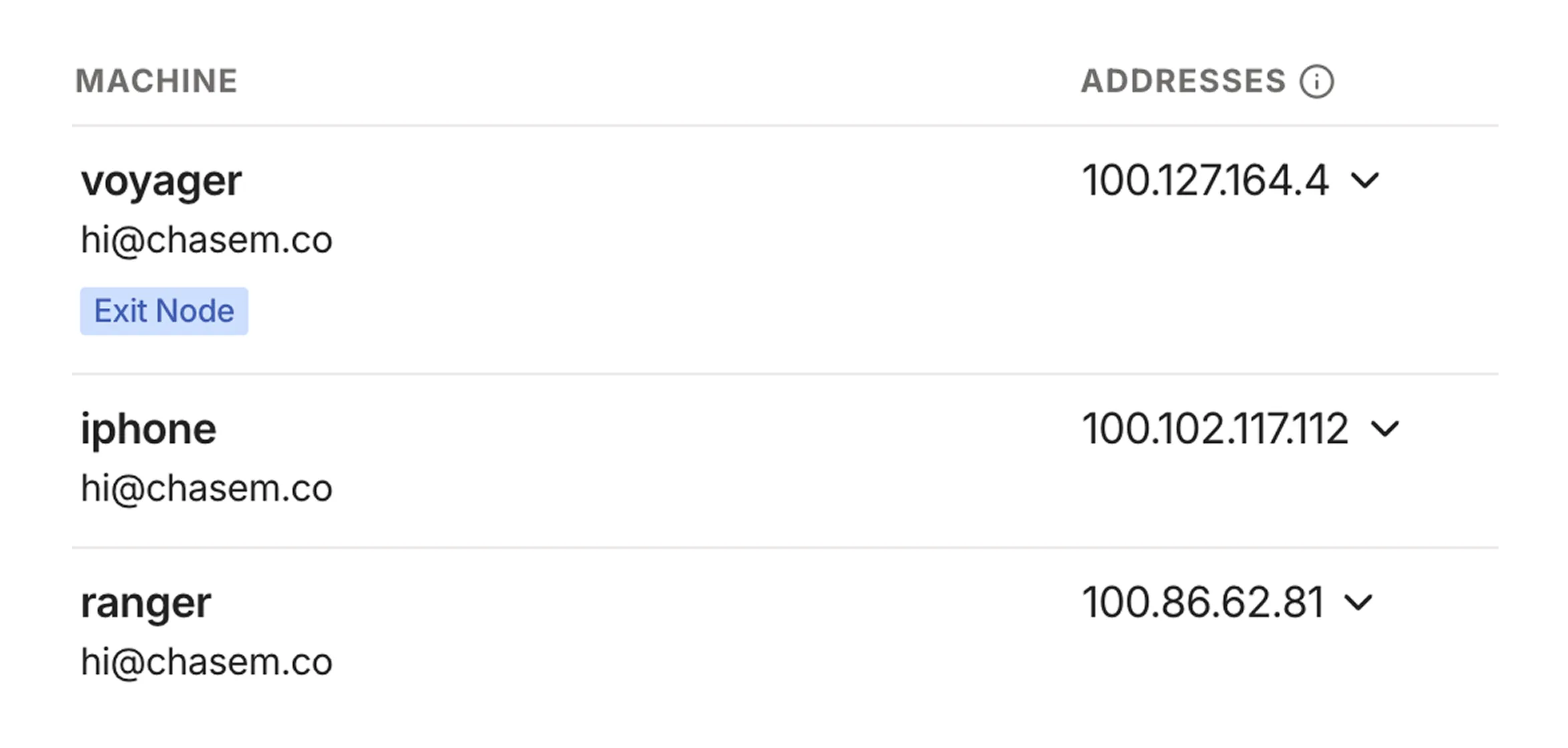
The Tailscale dashboard lists your machines and the addresses associated with each one. It's safe for me to share these because they're only accessible on my private Tailnet, which my devices access via the Tailscale client.
You can now spin up a web server on your Mac and access it on your other devices using the assigned domain name combined with the port. Later I’ll discuss how to set up custom domain names for your services so you don’t need to remember what’s running on which port.
You can also now screen share and remotely control your Mac from anywhere in the world. Simply repeat the steps mentioned above, but replace the local IP or hostname in the vnc:// address with the ones provided by Tailscale.
Manage and access your software
Now that your cloud computer is set up and accessible remotely, it’s time to put it to use!
Any app running on your machine that is exposed on a local port will be accessible over your Tailnet, but we need to make sure that those apps are always running and restart automatically if, say, our machine reboots or the app crashes. For this, we’ll use a process manager called PM2.
Start by installing PM2 globally using npm:
npminstall pm2@latest -g
Next, we’ll create a PM2 configuration file that specifies the apps we want to run and manage. Execute the following command to generate an ecosystem.config.js file:
pm2 init simple
That will create a JavaScript config file called ecosystem.config.js in the current working directory. It doesn’t matter too much where you store this file (mine lives in the home directory). The file contents will look something like this:
The important bit here is the apps array that contains objects representing the services we want to run and manage. Each app, at the very least, will have a name and a script that should be executed to start the app.
This tells PM2 to run yarn start within the directory specified by cwd (current working directory) whenever starting the process.
Once your PM2 config file is ready to go run pm2 start ecosystem.config.js to start up all of the apps defined therein. Swap the start for stop there to stop all of your apps. Check the PM2 docs for all of the available options and commands.
Now that we’ve told PM2 about our apps, we need to make sure it’s configured to start them whenever our Mac reboots. PM2 makes this easy—run the following command:
pm2 startup
This will output a terminal command that you’ll need to copy, paste, and run. Once that’s done, PM2 itself will be set up to run whenever your machine boots.
Finally, we need to tell PM2 which apps should be restored on reboot. Luckily, the config file we created defines all of these, so we’ll just start PM2 with that config and then save the list of current processes:
pm2 start ecosystem.config.js
pm2 save
If you ever make any changes to your config file, you’ll want to repeat this step to ensure those changes are picked up by the launch daemon.
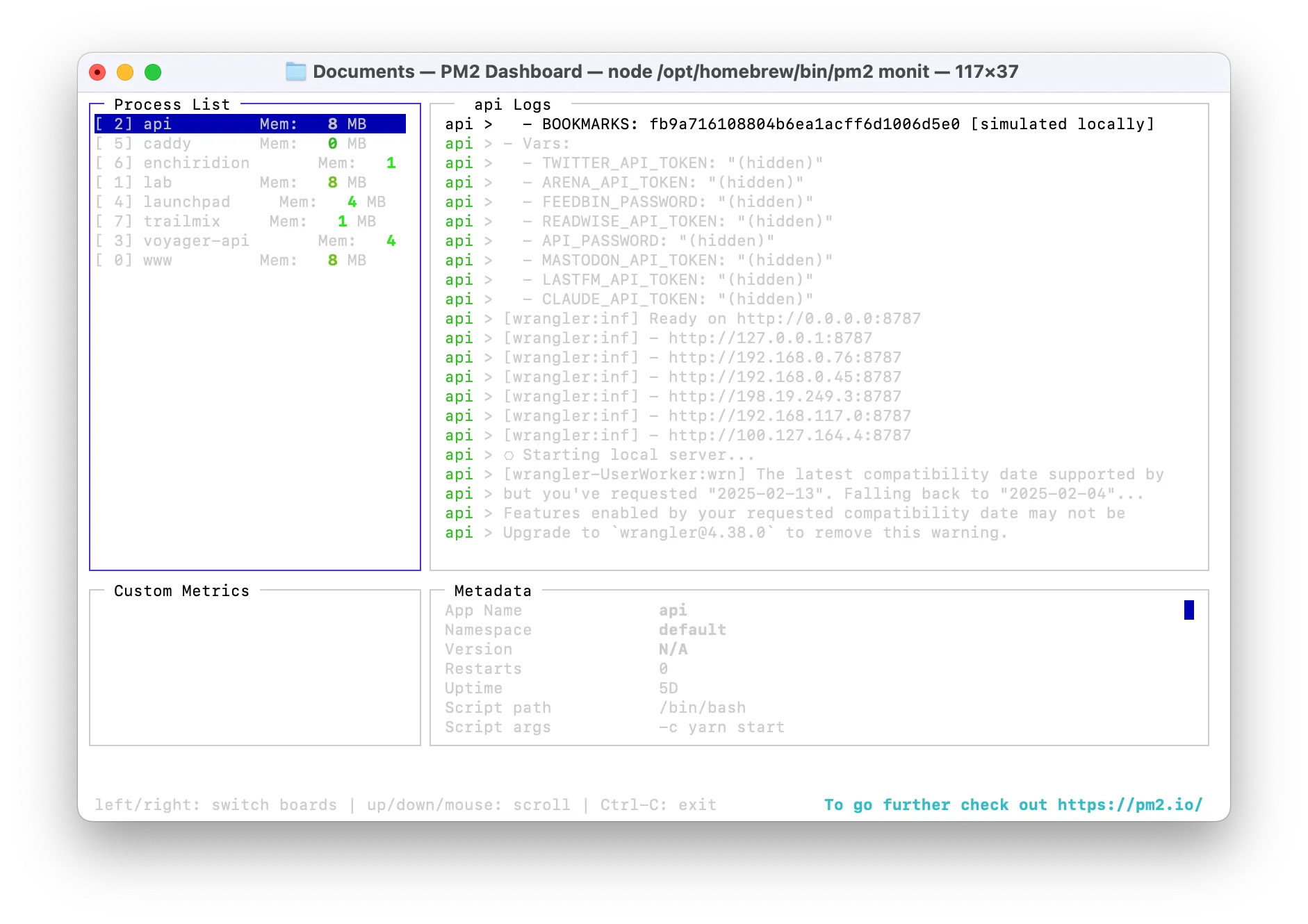
PM2 comes with a great terminal UI for observing the status of your running apps which you can access by running pm2 monit. I like to keep this running in a terminal window on my Mac mini so I can see the status of my apps at a glance.
Custom domains (optional)
The last step in perfecting this setup is to assign custom domains for the apps hosted on our cloud computer. This is nice because we won’t need to memorize or keep track of which app is running on which port number.
There are many way to get this to work, but the solution I found to be the most straightforward uses a combination of Cloudflare as a domain registrar and a reverse proxy tool called Caddy.
You’ll need a domain name registered on Cloudflare that that you’d like to use for your cloud computer. Separate apps/services running on the machine will be assigned to subdomains.
Configure DNS
The first step in this process is to point our domain on Cloudflare to the IP address of our server on Tailscale. Navigate to the Machines tab in your Tailscale dashboard, find your server in the list, and copy the IP address assigned to it by Tailscale. We’ll need that address for the next step.
Next we’ll update the DNS configuration of our domain to have it route to our machine on Tailscale. In the DNS records panel for the domain, create a new A record pointing to the IP address you copied from Tailscale. Use the domain name for the “name” field, and be sure to uncheck the option to proxy through Cloudflare’s servers.
Install and configure Caddy
Caddy will proxy requests to our machine to specific ports, and will take care of setting up an HTTPS certificate for us.
You’ll need to download and install Caddy with the Cloudflare DNS plugin, which can be found here. Select the appropriate OS/platform, search for and select the caddy-dns/cloudflare plugin, right click the Download button, copy the URL to your clipboard, and use it within the following commands.
# Download Caddy with the Cloudflare plugin# Replace the URL with the one you got from the Caddy downloads pagesudocurl-o /usr/local/bin/caddy "https://caddyserver.com/api/download?os=darwin&arch=arm64&p=github.com%2Fcaddy-dns%2Fcloudflare&idempotency=89062609982188"# Make Caddy executablesudochmod755 /usr/local/bin/caddy
# Verify that Caddy is installed
caddy --version
Once Caddy is installed we need to create a Caddyfile to specify which URLs will be reverse proxied to which port running on our machine. Create a file named Caddyfile, stick it anywhere on your filesystem, and update it to look something like this:
You’ll need to replace the CLOUDFLARE_API_TOKEN string with an actual API token acquired from Cloudflare. Navigate to Cloudflare’s API token page in profile settings and generate a token that has zone DNS edit permissions. This step allows Caddy to connect to Cloudflare via its API to ensure SSL certificates are automatically set up for our domain.
In the example above, subdomains of the root domain (for me, chsmc.tools) are reverse proxied to specific ports on localhost. You’ll of course want to update this to match your domain and the ports on which your processes are running.
Finally, we’ll update our PM2 config to include Caddy as one of its managed processes. In the apps array within the PM2 config file we created earlier, add the following:
Make sure the cwd property points to wherever you saved your Caddyfile.
While it requires some initial setup, I’ve been very pleased with this solution both in terms of its usefulness and how little maintenance has been required after getting up and running. I’ve had virtually no down time or cases where my server was inaccessible for any reason, and I only do maintenance about once a month to update the OS, the software running on the device, etc.
It’s also pleasing to know that all of this is running on a machine in my home. There’s something really satisfying about the knowledge that an increasing part of my daily toolkit is code I wrote running locally on a happy, humming machine in my apartment.
The point of all this isn’t to replace the open web: it’s to create a low‑friction space, a laboratory, where we can experiment with and run software without the headache of sign‑up flows, hosting providers, authorization, dependency overload, or vendor lock‑in.
I started by using my cloud computer to run a couple of scripts, but over time I’ve built up such an arsenal of tools that my little machine feels in many ways like more of a companion than the computer I carry in my pocket every day.
For me, perhaps even more than AI coding tools and app builders, this bit of kit has made software feel more malleable and approachable than ever.
All designers have an origin story, and mine is rooted in a childhood obsession with fictional and futuristic interfaces. I watched science fiction not for the story or characters, but for a glimpse at what a computer could be.
One of my favorites was Star Trek and the LCARS (Library Computer Access/Retrieval System) interface for the ship’s computers. Here is an interface that breaks free from the rectangle! It uses lots of colors and sounds! It’s fantastic.
I can’t wait to find a reason to build something with this.
Someone found the real Spotify accounts of famous politicians, journalists, and media/tech figures and scraped their listening data for more than a year. They’ve published some of the data online as the Panama Playlists.
The Panama Papers revealed hidden bank accounts. This reveals hidden tastes.
Scroll in wonder and/or horror!
File this one away as another excellent example of culture surveillance, which I’d argue would make for an excellent entry in an updated addition of the New Liberal Arts.
We all have our own antilibrary, the books we buy with the best intentions of reading but never quite get around to. For architects, a similar concept might be the sketches and plans that never leave the drawing board: antibuildings?
I’d venture to say there’s likely as much to learn in studying the antibuildings of great architects as there is in studying those works that have been fully realized.
Frank Lloyd Wright left behind a treasure trove of antibuildings (582 that we know of!), and artist David Romero has been creating digital models based on their plans as part of a project called Hooked On The Past. That includes The Illinois: FLW’s ambitious plan for a mile-high skyscraper in downtown Chicago that would have been twice the height of the Burj Khalifa.
Mary Oliver once said that “attention is the beginning of devotion.” I want to highlight a few examples of this in practice that have recently crossed my desk.
First: the YouTube channel of Baumgartner Restoration, of which I’ve been recently obsessed. The videos feature the proprietor, Julian Baumgartner, narrating the painstaking process of restoring and conserving fine works of art.
There is some peculiar pleasure in seeing a centuries-old painting transformed under steady, gloved hands. It’s not just the ASMR crackle of varnish being carefully removed, or the delicate touch with which he inpaints a lost eyelash on a Madonna’s cheek. It’s the sense that you’re witnessing a dialogue across time: a conversation between the artist, the restorer, and the persistent materiality of the canvas itself.
As a generalist it’s incredible to see the combination of disciplines that go into this sort of work: chemistry, material science, fine arts, woodworking, history, and more. Plus it’s just really relaxing to watch!
One of the foundational principles in art restoration is reversibility: the notion that any intervention made to a work should be removable without harming the original. It’s a kind of humility encoded into the restorer’s practice, a tacit acknowledgment that today’s best solution might be tomorrow’s regrettable overstep. You see this restraint in Julian’s work: the materials he uses are chosen not just for their compatibility with the painting, but for their ability to be taken away if future conservators, armed with better tools or new information, decide to try again.
But what happens when the artwork in need of restoration isn’t made of oil and pigment, but of code and pixels?
Brandon isn’t a painting hanging on a wall; it’s a sprawling, interactive digital narrative exploring gender, identity, and the malleability of self in cyberspace. The work, like much of the early web, was built on now-obsolete technologies like Java applets, deprecated HTML, and server-side scripts that no longer run on modern browsers. Restoring this piece isn’t about cleaning and repairing a surface but rather reconstructing an experience, reanimating a ghost in the machine.
Not to mention the piece is made up of 65,000 lines of code and over 4,500 files (!!).
The restoration of Brandon focused on migrating Java applets and outdated HTML to modern technologies. Java applets were replaced with GIFs, JavaScript, and new HTML, while nonfunctional HTML elements were replaced with CSS or resuscitated with JavaScript.
Don’t miss the two part interview with the conservators behind the project. (And please, if I am ever rendered unconscious, do not resuscitate me with JavaScript.)
In the physical world conservation is tactile, direct: a kind of respectful negotiation with entropy. In the digital realm it’s more like detective work, piecing together lost fragments of code, emulating vanished environments, and making decisions about what constitutes authenticity.
There’s an odd poetry in this sort of work. Just as a restorer must decide how much to intervene—when to fill in a crack, when to let the passage of time show—so too must digital conservators choose what to preserve: the look and feel of a Netscape-era interface? The original bugs and quirks? The social context of a work that once existed in the wilds of early internet culture? The restoration of Brandon becomes not just a technical project, but a philosophical one, asking what it means to keep an artwork alive when its very medium is in flux.
In both cases the act of restoration is, at heart, an act of care. A refusal to let things slip quietly into oblivion. It’s love as an active verb, the intentional transfer of energy.
And perhaps, as our lives become more entangled with the digital, we’ll find ourselves needing new ways to honor not just the objects we can touch but the experiences, stories, and communities that flicker across our screens. I personally feel very grateful that there are organizations and individuals taking on this sort of work.
Both of these examples remind us that conservation is less about freezing the past than about paying attention to it, and keeping it in conversation with the present. In that dialogue we might discover new forms of devotion: ways to care, to remember, and to imagine what else might be possible.
It’s not every day that you get to experience a whole new color, and yet: scientists recently viewed an entirely new color by firing lasers to manipulate individual cone cells. No, really!
Most of us don’t have precise eye-lasers at home, but luckily there’s a workaround to approximate the effect. A biological cheat code, if you will.
This blog post over at dynomight.net features an animation you can stare at for a bit and, eventually, you might see the new mystery color. It works pretty reliably for me, and it is kind of wild. My brain doesn’t expect a screen to be able to produce such a saturated color.
You might describe the color as a sort of HDR cyan, but luckily the authors of the paper gave it a much better name: olo.
Olo! To quote the paper, “olo lies beyond the gamut.”
Why do we hallucinate this specific color?
M cones are most sensitive to 535 nm light, while L cones are most sensitive to 560 nm light. But M cones are still stimulated quite a lot by 560 nm light---around 80% of maximum. This means you never (normally) get to experience having just one type of cone firing.
Because M and L cones overlap in the wavelength of light they capture, we don’t get to see the full range of either cone without lasers or mind tricks. Kinda like that myth about not being able to use 100% of our brain power, but in this case: cone power.
Here’s something that checks all kinds of boxes for me: Lori Emerson has a gorgeous new book coming soon (April) called Other Networks: A Radical Technology Sourcebook, which you can preorder now from publisher Mexican Summer.
Other Networks is writer and researcher Lori Emerson’s speculative index of communications networks that existed before or outside of the internet: digital as well as analog, IRL as well as imagined, state-sponsored systems of control as well as homebrew communities in the footnotes of hacker culture.
You would be hard pressed to purposely conceive of a book more squarely aimed at my niche interests. And the book itself is a beautiful hardcover tome, rife with archival imagery as well as original artwork. Instant preorder material right here.
I really enjoyed this writeup from Matt Webb about extending AIs using Anthropic’s proposed Model Context Protocol. In its own words, MCP is “an open protocol that standardizes how applications provide context to LLMs”.
Back in 2023 I wrote a bit about an early attempt at something similar by OpenAI and was pretty excited about the potential. MCP takes things to another level by making it an open protocol. Anyone can host an MCP server, or create a custom client that works with any language model.
Protocols are cool! And it’s fun to explore them. So I wanted to get a sense of MCP for myself.
I was pleasantly surprised by how easy it was to get started with and see the potential of MCP servers. You don’t even have to build your own as there are lots that have been built and shared by the community. Here’s a great list of reference servers by Anthropic, and there are also over a thousandopen source servers available.
If you do want to build your own, I recommend checking out this video from Cloudflare on how to get started using their open source workers-mcp package.
But to quickly get a sense of the potential of MCP, I recommend checking out an existing server first. I decided to start by exploring the Filesystem MCP server which is exactly what it sounds like: a server that gives an LLM access to your filesystem through various tools like read_file, list_directory, search_files, etc. This is great place to jump in and see the potential of MCP.
Adding the server to Claude’s desktop application (one of several clients that currently support the protocol) is as simple as dropping this into the app’s config file:
All this is really doing is allowing the LLM to run an npm package which implements an MCP server. Neat!
After restarting the Claude app, I was off to the races. I use Obsidian as my personal knowledge base, and the great thing about it is that it stores notes as plain text on the filesystem. Combined with the filesystem MCP server, I could now ask Claude about my own notes.
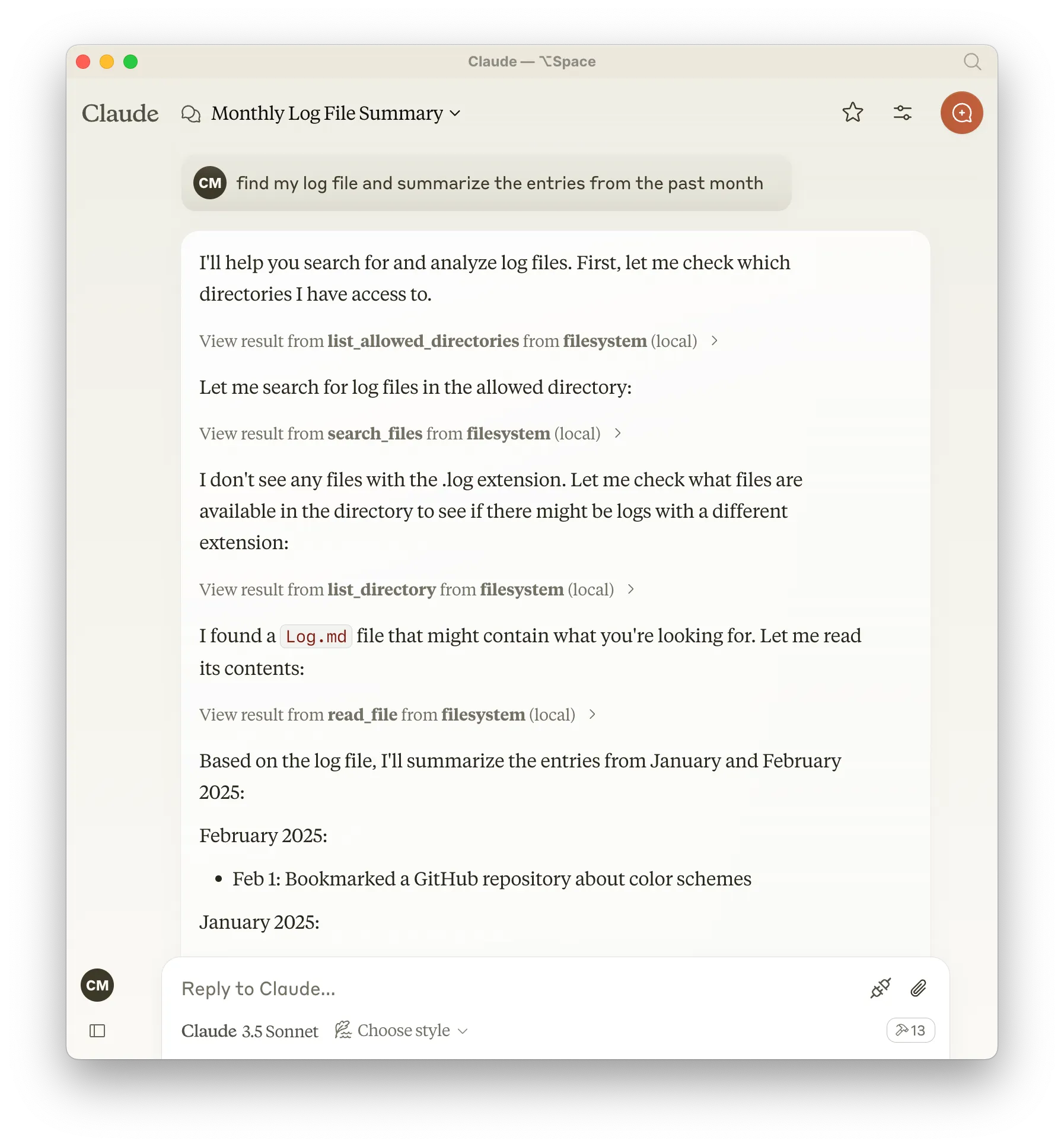
Here’s a screenshot from my very first time using the filesystem MCP server in Claude. I asked it to find my log file (the file I use for running notes throughout a year) and summarize the entries from the past month:
What’s fascinating here is the chain of thought the model goes through, and how it uses the tools exposed via the MCP server to solve problems. It starts by searching for files with a .log extension, doesn’t find anything, and thus broadens its search parameters and tries again. It’s then able to find and recognize my Log.md file, read its contents, and summarize them for me. Neat!
I’m really excited about the potential here to make computers more malleable for the masses. There’s been a lot said about the ability for non-technical folks to create their own apps using LLMs, but the ability for those LLMs to manipulate data and interact with APIs themselves might even reduce the need for a lot of dedicated apps entirely.
Contrary to oft-repeated wisdom, the internet isn’t written in ink. Physical ink on paper is often a far better method for carrying data forward into the future. Manuscripts that are hundreds and even thousands of years old are still with us, and still being discovered every day. Will the same be true of our own data a hundred years from now?
Physical collections benefit from their form: by taking up space in the real world they demand attention and care. Digital collections more easily fall into the trap of “out of site, out of mind”. How many online services have you signed up for, added data to over time, and then later forgotten about? How much of our data, the traces of our lives online, are permanently lost?
It’s amazing how fragile we’ve let our data become. When I hear about someone who loses a device and with it their entire digital photo collection (if not backed up), I consider it a tragedy. Photo albums used to be sacred heirlooms, passed down through generations to remind us all that we come from certain people and places. Now we turn over all of that data to a custodian like Apple or Google, and we don’t think about whether their stewardship will continue throughout or beyond our lifetimes. Will Apple exist and still be storing my photo library in 100 years? Even if the data exists somewhere, will there be a way for me to access and view it?
I worry about this especially for those of us who aren’t chronically online or attached to their devices, who might not understand the effects of fragmentation and walled gardens might have on them in the future, and who don’t have the foresight or knowledge to protect their data for the long haul.
Even digital artifacts that are preserved are still lossy in an important way. When looking back at the work of creatives from the past, we can trace their process through a series of physical artifacts that lead up to a final work. Digital files are often “flattened” representations of a creative process, capturing the final state but missing the messy middle. Another way our digital legacies are flattened is through the loss of metadata. Traditional filesystems lack standard ways of capturing the context around files: why they were created, by whom, how they relate to other files, what topics they pertain to, etc.
It feels more important than ever in a future with LLMs that we not only control our data, but that we all maintain our own sort of wildlife preserves made up of content unspoiled by computer generation. Over time I expect original, unique datasets will become a commodity for those looking to train models.
Managing our data has only gotten more difficult as personal computing has gotten more sophisticated. So much of our digital lives have moved from our machines and into the cloud. Our documents, photos, and music used to exist on our devices where they could be backed up and preserved, but now they exist more and more in privately-owned corporate silos.
It’s no surprise that we turn to these tools. Organizing and browsing the masses of data we generate is not a task well served by modern operating systems. People love online tools like Notion, Airtable, and Google’s suite of apps because they make it easy for consumers to organize data in a way that makes sense to them. They make it searchable, shareable, and available everywhere. But this power comes at a cost: we hand our data over to privately-owned silos whose long term existence is far from guaranteed.
Sure, you could store all of the same data on your computer as you could in a tool like Notion. But I think the metadata those tools allow for is what is so important to preserve. A folder full of files is limiting compared to the database-ness of something like Notion.
In order to properly organize, retrieve, and preserve massive amounts of data (which we all generate nowadays simply by being online) we need ways of tagging, commenting on, sorting, filtering, slicing, linking, searching, etc. A folder is static, representing one way of looking at data, but most information is useful in many contexts.
The rise of graph and database-like features in popular tools like Notion or Obsidian is a sign that the simple filesystem has failed us. And that failure has pushed us towards other solutions which require sacrificing ownership of our data.
If an average consumer wanted to organize information like they might in Notion while maintaining ownership and storing their data locally, I literally do not know of a solution that doesn’t involve administrating a database. That’s crazy, right?
Personal computers could feel like this
I’d love to see these sorts of use cases solved for at an operating system level. Third party apps have been a great way to experiment with new computing primitives, but at some point those primitives need to exist without the compromise of giving away control of our data. A simple, hierarchical file structure just doesn’t cut it when it comes to organizing and making use of the massive amounts of data we accrue simply by being a human on the internet.
What might that look like? I’m not sure, but taking cues from relational and graph databases is probably a good place to start. Imagine databases a la Notion as a first class feature of your operating system. A GUI built in to browse and organize a vast repository of data, and programmatic ways for 1st and 3rd party apps to hook into.
One place we might take inspiration from is Userland Frontier, an object database and scripting environment for both native and web applications. Frontier made it easy to create your own software, using your data, on your terms.
At the center of Frontier was its object database, a set of nested tables that could contain data, scripts, bespoke UIs, and, of course, other tables. The object database could be browsed visually via an app, and accessed easily in scripts where you could persist data to disk as easily as setting a variable.
Frontier was first and foremost a developer tool, but I think the ideas contained therein are powerful for average consumers as well. I keep using Notion as an example, but it demonstrates perfectly how these ideas could resonate beyond developers.
It’s inherently geeky, since it’s a developer tool. But at the same time it’s more accessible than text editor + command line + Ruby/Python/whatever. It can give more people a taste of what power on the internet is like — the power to create your own things, to re-de-centralize, to not rely on Twitter and Facebook and Apple and Microsoft and Google for everything.
Our computers should be databases! We should be able to script them, access them using browser APIs, browse them via a first party application, etc. They should accrue data and knowledge over the course of our lifetimes, becoming more useful as we use them. They should be ours, something we can control and back up and preserve long after we’re gone.
Bespoke software, created on the fly is becoming increasingly common thanks to AI. But software is only as useful as the data it’s able to operate on.
All of our emails, recipes, playlists, text messages, Letterboxd reviews, TikTok likes, documents, music, photos, browser histories, favorite essays, ebooks, PDFs, and anything else you can imagine should be something we can own, organize, and eventually leave behind for those that come after us. An archive for each of us.
One of my favorite albums from last year was Mk.gee’s Two Star and the Dream Police, so I was delighted to recently discover this collaboration between Mk.gee and another artist I like called Dijon. If the electricity of their creative partnership in this video doesn’t get you excited, I don’t know what will.
Happy New Year! I’ve returned from holiday travels and am settling back into work for 2025. Here are three, quick, bookish recommendations from links that have crossed my desk recently.
Katie runs an independent bookshop in Lancashire, and every Friday when she opens the shop she also starts a new draft of the newsletter. Throughout the day she fills it up with commentary on running a bookshop in these modern times, quips from the shoppers, witty observations, a record of books sold and purchased, etc. At the end of the day, she closes the shop and sends the newsletter.
One of my favorite genres of art is “totally mundane but fascinating and engaging for reasons that are hard to explain,” and Receipt from the Bookshop fits that bill perfectly.
More than just being fascinating, though, it’s a good reminder for us all how creativity and fulfillment as a writer can come from mundanity. There is beauty in the mundane! We can find it if we look hard enough.
Whatever this is: more of it please.
Books are powerful cultural artifacts, and so much of human history is wound around them. It should be no surprise then that notebooks carry a similar significance.
Well that’s just what Roland Allen’s book, The Notebook: A History of Thinking on Paper, is all about. I picked it up recently after seeing it recommended by a few folks in their 2024 reading recaps.
The cast of historical characters that pop up throughout the book is a lot of fun, and the author does a great job of showing just how critical notebooks were to the development of civilization and culture as we know it today.
Another truly great example of something unassuming (notebooks) being explored with a contagious enthusiasm. There is, repeatedly, poetry in the mundane.
By the way, I love reading books which tell history non-linearly through the lens of ultra-niche subtopics. Another great example that comes to mind is Fallen Glory: The Lives and Deaths of History’s Greatest Buildings by James Crawford. Books and buildings both make great portals back in time.
Finally, a celebration of the book collectors, dealers, sellers, and conservators who preserve the art of books and bring the most important ones along into the future.
While reading The Notebook: A History, I stumbled upon a 2019 documentary that resonated on the same frequency.
The Booksellers, which (from what I can tell) has recently been made free to watch on YouTube, focuses primarily on rare book dealers in New York City and their bookshops, and it’s a visual feast for book lovers. But more importantly it’s an homage to those still dedicating their lives to preserving the written word and the book as a form.
There’s a clear and present danger to the world of books that is felt palpably in the documentary, with many sellers and collectors worried about a diminishing market for book collectors. There are also those in the film who see a bright future. It’s nice to hear both takes.
As for myself, I am a huge fan of collecting physical books, and maintain a digital version of my collection which you can browse if you’d like. Whether you collect books or not, I recommend giving The Booksellers a watch.
Some personal news: after four years of working on design systems at Stripe, I’m leaving to join Era as a design engineer.
This change is going to be pretty big for me in a few ways. I’ll be going from a large, enterprise company to a tiny, consumer startup. It will also be the first time in ~9 years that I won’t be focusing on design systems.
Why the change? One of the reasons is a desire to sharpen my hard skills. Running a design system involves lots of glue work, and while I really love that type of work, I could feel my core design and engineering skills atrophying.
Design systems work can also be very repetitive. I should feel as though I have 9 years of experience building and operating design systems, but instead I feel like I have 3 years of experience repeated 3 times.
Rather than jumping into another design systems role where I will ultimately repeat a lot of the work I’ve already done for other companies, I’ve decided to move to a role where I can practice my core skills daily on new and exciting problems, and ship software directly to end users.
And then there’s the burnout. Working on systems is hard, especially when you’re working in an organization doesn’t understand or value that kind of work.
The constant need to explain why what we’re doing is valuable is exhausting, and really feeds into that feeling of futility - that nothing we do is ever enough.
What I didn’t understand then, but I’m painfully aware of now, is that a lot of folks in management don’t get this kind of work. They can’t sell the work to leadership because folks in management often don’t use the product they work on. And they can’t see progress made because they’re not building the same thing that you are. They’re not building software, they’re building a giant spreadsheet of numbers.
Our industry will have to reckon with the tension between building quality software at scale and failing to understand and value platform teams. But I will not sit around and wait for that reckoning to happen.
I wanted my next gig to be as far on the opposite end of the spectrum as possible, focusing directly on designing and building a product with a small team of passionate builders. That’s why I’m so excited to join Era, a startup focused on building a consumer finance app to help anyone and everyone make the most of their money.
Like so many others, I grew up in a middle class family with parents who worked hard just to make ends meet and provide for my future. Investing was a foreign concept to me until later in life when I became more financially literate.
There are so many folks out there who make good money but don’t know what to do with it or how to manage it. Era wants to put a financial assistant in their pockets, and I’m excited to help with that mission.
Will I work on design systems again in the future? Maybe, if it feels right. In the meantime I’m going to enjoy shipping some hand-crafted software.
I really enjoyed Kyle Chayka’s latest piece for The New Yorker about using the Process Zero feature of the Halide camera app for iPhone, which forgoes the AI-powered image processing that iOS applies by default.
My phone camera roll looks different now. There are fewer repeats or slight variations on the same image, taken in a burst. The compositions are less static or symmetrical, and the colors are funkier. I have a Halide snapshot of some leaves casting shadows on a tree’s trunk, which occupies most of the frame. Whereas the Apple phone app tends to turn every color warm, this one is very blue and cool, and the background behind the tree is dim rather than eye-burningly brightened. But I prefer the photo that way: the visual qualities of the specific scene are still there to be appreciated. It doesn’t, and shouldn’t, look like everything else.
I’ve been using Process Zero the past few weeks as my main shooting mode, and I couldn’t agree more. I don’t see myself going back to the iPhone’s default image processing.
It occurs to me that Process Zero is popular for the same reason as Instagram’s original filters—imperfections imbue a kind of personality that feels more human. AI-perfected pixels feel cold and lifeless because they optimize and average away the details, leaving photos without any distinct “vibe.”
The images that an iPhone produces by default are a form of advertising for Apple. Buy an iPhone, snap a photo, and it will always look great. The uniformity of the experience ensures the results are always good, but it has the side effect of preventing them from feeling great.
Apple has a history of sherlocking great features introduced first in third party apps, and I would be very pleased if they decided to bake this into the native camera app.
A good day on the web is one where you stumble across a website that makes you go “woah??” and then “huh…?” followed by a wide grin. I have one of those websites to show you!
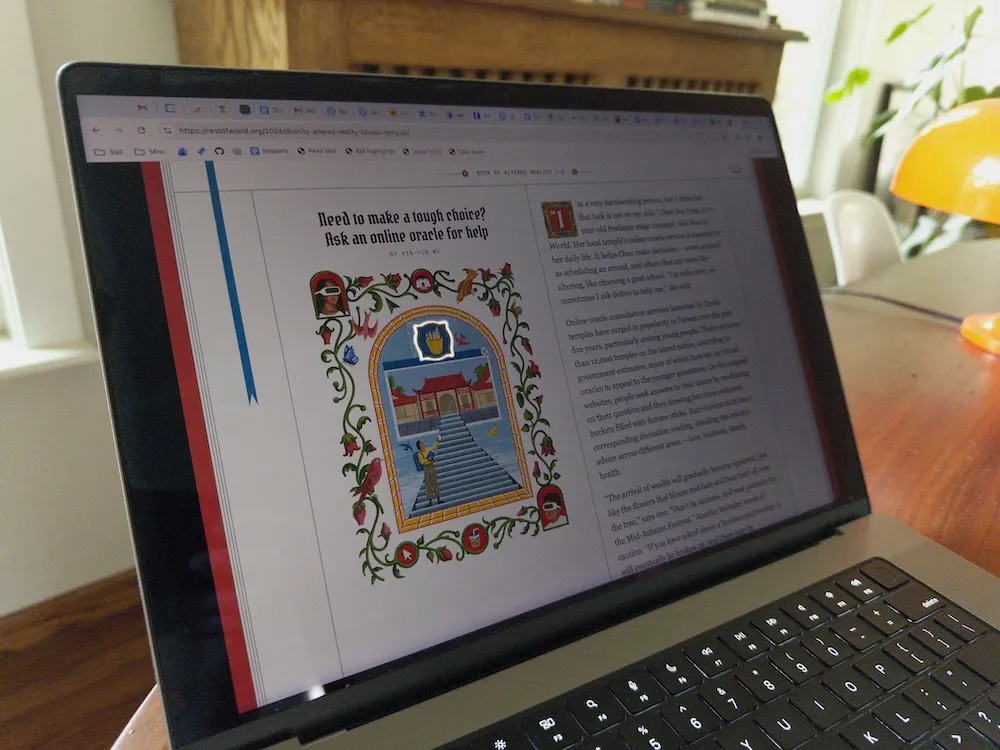
Digital Divinity is a really neat project documenting the ways in which new technologies are being incorporated into religious practices. Each entry is accompanied by a lovely illustration from an artist named Glenn Harvey.
Those illustrations are hiding a secret though, one that is only revealed on specific devices under specific conditions.
You might be aware of a visual effect related to HDR videos if you’ve ever scrolled Instagram on your iPhone—the pixels displaying the HDR content display in full brightness, while the rest of the screen is slightly dimmed.
The effect can be disorienting and strange, especially for content that is pure white, which appears as some kind of ultrawhite. It makes other white areas of the screen look pale and pallid.
The illustrations for Digital Divinity make use of this effect in a brilliant (literally) way by masking a pure white, HDR video such that parts of the illustration glow with an ethereal brightness. For devices that support displaying HDR content brighter than the rest of the screen, the effect is stunning.
It’s quite difficult to get an image of the effect that captures the striking glow, so I definitely recommend checking out the site on your own device.
This is the kind of creative touch that makes designing for screens so special: our work gets better when we give ourselves over to the unpredictability of the medium. Many users will never see this effect because their device doesn’t support it, but rather than flattening the experience for consistency the designers behind this project decided to embrace the chaos.
Every device and screen is different, and one of the biggest mistakes we can make in web design is pretending as if we’re creating a singular experience to be experienced uniformly by each user. There are opportunities for delight in the gaps created by our medium’s flexibility.
Kudos to all of the designers who had a hand in this wonderful project.