Chase McCoy is a blogger and design engineer. He works at Anthropic on Claude and writes here about the web and other creative technologies.
Riley Walz hid a solar powered Android phone in the Mission and set it to run Shazam all day, every day. The result is Bop Spotter, a site listing all of the songs that have been detected.
This is culture surveillance. No one notices, no one consents. But it’s not about catching criminals. It’s about catching vibes. A constant feed of what’s popping off in real-time.
Culture Surveillance is a newsletter to which I would happily subscribe.
Throughout my career as a designer, I’ve experienced a recurring struggle with the concept of process.
I used to look at process as something sacred: a holy calculus through which I could find the right answer to a problem every time. All I needed to do was remember the steps and apply them in just the right way. Wash, rinse, repeat.
Maybe this idea stems from my background in programming, or maybe it’s just an attempt to comfort my own fears and insecurities, but I wanted my work to follow a clearly defined algorithm.
The way I’ve seen great work made isn’t using any sort of design process. It’s skipping steps when we deem them unnecessary. It’s doing them out of order just for the heck of it. It’s backtracking when we’re unsatisfied. It’s changing things after we’ve handed off the design. It’s starting from the solution first. It’s operating on vibes and intuition. It’s making something just for the sake of making people smile. It’s a feeling that we nailed it.
For me, overly relying on process might also have been borne out of a distaste for what I perceive to be the opposite of process: vision. Blue sky design visions, if not done with care, can turn into uninformed expressions of ego and hubris.
If you’ve worked within a large design organization, you’ve probably seen this play out. A designer, usually one with lots of tenure or clout, goes heads down to produce a north star for the design direction of a product that is usually impressive but disconnected from both the needs of users and the realities of building real software.
Visions too often fall out of a coconut tree, not existing within the context of the current product or what came before it. (Sorry, I had to.)
Of course, vision work can be useful as an instigating factor: to excite stakeholders, secure funding, or drive alignment by raising key questions. But too often these visions are taken more seriously than they should, and they get handed down to other teams in place of an actual roadmap.
I think that the act of designing and shipping real solutions happens somewhere in between process and vision. It’s not a carefully defined algorithm, and it’s not a moonshot.
If you want to find a good design—be that the design of a house or an essay, a career or a marriage—what you want is some process that allows you to extract information from the context, and bake it into the form. That is what unfolding is.
Click through for a more details explanation of how unfolding works.
Henrik goes on to say that unfolding is the opposite of vision, but I like to think of vision and rigidly defined process as two ends of a spectrum, with unfolding sitting somewhere in the middle.
The opposite of an unfolding is a vision. A vision springs, not from a careful understanding of a context, but from a fantasy: if you could just make it into another context your problems will go away.
None of this is to say that there is no place for more formal processes. When unfolding a problem we need to establish feedback loops and respond to those in a way that resembles improv, but the act of responding may itself leverage repeatable processes.
We might choose to think about these recurring patterns in our work as frameworks, which are applied to solve specific problems or answer certain questions.
For example: unfolding a problem might present a difficult decision that needs to be made, and that’s when leveraging a decision making framework might be useful.
Should every decision that needs to be made have that framework applied to it? Absolutely not! And it’s our job as designers to know what parts of our work should be scripted and what parts should be improvised.
I’m trying to let go of my conditioning to attack every problem with process, and these ideas are helping me frame my work in a way that invites spontaneity and is less concerned with artifacts of the work that aren’t actual software. Because at the end of the day, any artifact that isn’t the product itself should be in service of the product, not any one person’s process.
I stumbled upon a great site which acts as an explainer for vanilla web development techniques called, well, Plain Vanilla.
When I was starting out as a developer I had a hard time learning the basics of the web platform because so many resources and examples used a framework. It was mostly jQuery at the time, and today I’d assume React and Tailwind are the most common starting points for new developers.
But the web has come a long way! A framework might not be necessary for lots of projects, and going as far as you can with the grain of the web comes with lots of benefits. I’m happy to see a high quality resource like this that can help folks avoid complexity and start simple.
I’m fascinated by the way that CSS, as it becomes more powerful, can be used as a visual language for representing the physical world. Combined with the longevity of the web, which strives to never break backwards compatibility, it’s a powerful tool for sending information into the future.
I grew up dreaming about the esoteric user interfaces seen in science fiction films, many of which featured circular screens, control panels, and UIs. Now we can achieve those with CSS!
I also love the whimsical nature of Orbit’s API, which requires a single “big bang” element on the page, and uses a “gravity-spot” class for creating an area with a radial layout. The library comes with support for adding orbits, slices, satellites, capsules, and more around user-defined gravity spots.
My hope is that this is a move to my forever domain, but if someone at JPMorgan Chase wants to chat about donating a better domain, they can find me (and so can you) at hi@chsmc.org
I recently showed a few friends around Chicago, and as we passed by the Art Institute and the two lions guarding the entrance, I wondered if they had names like the lion sculptures outside the New York Public Library.
New York’s lions have had several nicknames throughout their lives, but received their current names from Mayor LaGuardia in the 1930s based on the qualities he thought New Yorkers would need to have to survive the depression.
So what about the lions in the second city? Strangely enough, they were also created by a sculptor named Edward.
Edward Kemeys didn’t names to these lions, which took their places in 1894, but did assign them unofficial designations based on their poses. The lion on the north pedestal is “on the prowl,” while the one to the south is “in an attitude of defiance.”
We don’t seem to assign names to the objects around us as much as we used to, but I think it’s an important part of creating meaning and connecting to our environment and our history.
Next time you’re in downtown Chicago, don’t forget to say hi to Prowl and Defiance.
Figma announced a host of new AI-powered features this week at their annual conference, and they have been received by designers with both cheer and dismay.
Tools like the ones that were announced are showing up across the industry, but as the most popular tool for modern product design, Figma will make them commonplace, and we’ll soon be taking them for granted just like any other advancement in design tools over the past several decades.
Some folks are panicked, some are excited, and some are indifferent. I’m somewhere in the middle, but I do have concerns that are exacerbated by these new tools and capabilities.
To explain those concerns, I’ll draw a distinction between two types of AI-powered features that Figma announced this week:
Using AI to eliminate or reduce the time spent on constructing designs and prototypes in Figma.
Generating UI designs from scratch, based on a text prompt, using models trained on common product interfaces (and, in the future, the work created by Figma users, unless they opt out).
I’m excited for and have very few concerns about type #1, because the job of product designers is not to create Figma mockups—it’s to solve problems and ship software.
To the degree that new features allow us to spend less time creating ephemeral artifacts that are merely a stop on the way to a final destination, I’m sold.
Those features involve things like automatically wiring up prototypes, filling in a mockup with fake data, translating strings into other languages, automatic layer naming, generating placeholder images, etc. These are all good and helpful, and are geared towards saving designers time to spend on things that they are uniquely positioned poised to do.
But what about type #2, the feature that Figma labels in its UI as “Make designs”? This allows anyone to enter a prompt and have Figma create a mockup from scratch. In the future, the company plans to train their models on designs created by users.
Some are concerned that this type of feature might take jobs away from product designers, and some see it as simply another way to automate away the tedious parts of a designer’s job in order to give them more time to do what they do best.
I think it’s both, and/but I don’t think it’s because of AI.
There are many companies, and the number seems to be increasing, that are more than happy to turn the jobs of designers over to folks who are able to wield tools to produce a facsimile of what a designer is actually capable of.
For those that see the primary value of designers as producing interface mockups, the advent of new AI tools in the vein of Figma’s “make designs” button will absolutely seem like a viable replacement for the work of a designer. And this isn’t limited to AI—as design tools become more accessible and approachable to everyone (which I consider a net positive on the whole), the barrier to creating something that looks, on the surface, like the work of a designer is lowered.
Canva is an excellent example of how this is not strictly because of AI, but might certainly be accelerated by it. The commodification of design as a practice began long before the widespread availability of generative AI.
Product managers, engineers, and others are now able to produce designerly artifacts easier than ever before, and too many companies are willing to accept the sub-par solutions that result in order to cut costs and move faster.
Machines will not make our jobs obsolete, but corporations will, and they’ll use smarter and smarter machines as an excuse to do so.
Many applications (including Chrome and Firefox) use a font rendering engine called HarfBuzz, and HarfBuzz recently added support for running arbitrary WebAssemply code in order to “shape” the pixels that are drawn onscreen when rendering a font.
You can see the font, llama.ttf, in action in this video.
I wonder if, in the years to come, it might be LLMs that get embedded into all the things.
A smart refrigerator that can reason about what’s inside and maintain a grocery list for you? A font that completes your sentences? A doorbell that answers in your voice and tone when you’re not at home? In-flight entertainment that generate content based on your preferences?
Strange times ahead.
One of my favorite forms of online content is when someone finds an interesting, obscure story from the past and manages to extract a lesson that’s widely applicable today.
I like to think of it as something like fan fiction: we, as individuals, retcon and re-tell stories from the past to help us make sense of the present.
It features the story of a king in 18th century Spain who ordered a geographer to create a map. The geographer attempted to delegate this work by asking the priests of towns across the country to create maps of their own provinces.
The idea was to put all of the maps together in the end, but because there was no standardization, all of the maps were created in entirely different forms. Those forms are beautiful! But ultimately not useful as an actual map.
Rather than seeing this as a failure, Elan asks us to consider the things we might be losing when we impose structure, standardization, and process. We might have gained a useful map, but we would have lost the creative perspective that each of the pieces represents.
I’m obsessed with this story because it gets at a dynamic embedded within everything designed that we rarely think about. Once you notice it, it is present in almost every conversation, at every aperture and zoom level: modularity is inversely correlated to expressiveness.
This hit me like a rock, in no small part because of my career focus of choice: design systems.
Fortunately, Elan goes on to reassure me:
I am someone that preaches expressiveness to a fault, but the truth is that I make decisions to scale all the time. I don’t necessarily see this as a compromise of values. There is beauty in trying to express something specific; there is beauty too in finding compromises to create something epic and collective.
I’ve remarked before on my gratefulness for CSS as the ubiquitous and expressive visual language of our times, a sort of design Esperanto (that is actually widely spoken).
One would struggle to find a more perfect example of this than Scribe, by Stephen Band. Scribe is a custom element (<scribe-music>) which renders responsive music notation in HTML and CSS grid.
Here’s an example, rendered inline via Scribe:
0 meter 4 1
0 chord D maj 4
0 note F#5 0.2 2
1 note A4 0.2 1
4 note D4 0.2 1
It’s remarkable that this is possible using CSS, and even more remarkable that the language itself morphs to become a syntax not for describing elements on a web page, but to describe pitch over time. CSS as interface for the natural world.
Under the hood, Scribe uses markup like this to represent music in time:
Elegant, useful, and thanks to the hard-won stability of the web platform: durable for generations to come.
One might wonder, what other natural or mathematical systems might we be able to represent in CSS? Another example that crossed my feeds recently is time-based CSS animations by Yuan Chuan.
Yuan creates a variable in CSS representing time, and uses keyframe animations to increment the value of the variable by 1 every millisecond. Suddenly CSS has a timer, something powerful for generative art and animation where time itself is used as an input variable.
Yuan has some great examples of how this can be combined with functions in CSS like min(), round(), and newly added trigonometric functioned like sin(), cos(), etc. to create all sorts of useful effects. My favorite example is using all of this to create a clock with a perfectly ticking second hand.
In terms of representing natural systems in CSS, this reminds me of how often I’ve wanted to be able to generate and use random numbers in CSS at runtime. To my delight, it looks like that’s in the works.
There are two new features coming to CSS that will make it much easier to further avoid JavaScript when implementing animations:
Animating to and from display: none; for the sake of enter/exit animations.
Animating to and from the intrinsic size of an element (such as height: auto;).
Traditionally, animating something into or out of the screen (as opposed to just hiding it visually) required JavaScript to remove the element from the page after waiting for the animation or transition to complete. No longer!
When these new features land in browsers, you’ll be able to animate to display: none like any other property using a keyframe animation:
You can also do the same thing with a CSS transition, but you’ll need to set the new transition-behavior property to allow-discrete for that to work. I can see something like * {transition-behavior: allow-discrete} becoming a part of my CSS reset in the future to enable this behavior by default.
But what about the opposite case? You have an element that’s currently not displayed and you want to animate it as it appears. Again, we typically use JavaScript for this today to ensure the initial styles are set properly and our element doesn’t display visually on the page before it has animated.
The second new feature coming to CSS is the ability to animate to and from an element’s intrinsic size. The most common use case for this is collapsible areas: we want them to be height: 0px when closed, and when opened their height should be automatic based on the contents.
Because CSS has historically not allowed for animating to height: auto;, we’ve had to use JavaScript to measure the height of the contents and animate to that pixel value.
When this feature lands in browsers, we’ll instead be able achieve this like so:
These features are just a few of the many ways that CSS is growing and becoming more powerful and expressive. To learn about all of the other great new things coming, check out this excellent video by Una Kravets from Google I/O.
Una says that we’re in the golden era for web UI, and I couldn’t agree more.
Judging by the discourse, web components seem to be gaining in popularity lately, and I’m very here for it.
Trying to build on the web using a component model was what led me (and others I’m sure) into the arms of React many years ago. While I’m grateful for that journey, and still believe React is the right choice for many projects, it gives me a lot of comfort to know there’s a native tool I can reach for.
The tricky thing with web components, like the web platform in general, is the flexibility. What makes it so powerful can also make it hard to learn, and even harder to know if what you’re learning is the right or recommended path. It takes time for best practices to form and percolate.
Many of my online acquaintances know that I live in Chicago, but I suspect they might not know that I’m from a small university town in Mississippi called Starkville.
Starkville is home to Mississippi State University, where I attended college and studied Computer Science. In 2017 I graduated and moved to Chicago to start my career.
At the time I was excited to escape the place where I spent so many of my formative years, a place which was the symbol of mundanity for me and my youthful ambitions.
Seven years later and I’m having coffee and catching up on my inbox when I happened to find the latest issue of Claire Evans’ newsletter: a delightful story about moon trees—that is, trees grown from seeds that traveled to space and around the moon 34 times during the Apollo 14 mission.
Claire traces the history of the seeds, which were germinated into seedlings and given out to foresters across the country before being largely forgotten about and then eventually rediscovered and catalogued by NASA.
Today less than 100 moon trees remain, but as Claire goes on to describe, there is a second generation of moon trees (so called “half-moons”) grown from the seeds of original trees that remain today.
The location of one of these mother-trees, though, is what caught my attention: it’s on the campus of Mississippi State University, my campus. All the times I walked past this humble tree I had no idea it had been to space.
It’s such a pleasant surprise to have this story appear in my inbox and show me something new about a place where I spent so much time.
While I lived there, I often felt suffocated by the mundanity of my home town. This has reminded me that there are things to appreciate and interesting stories (of perhaps cosmic proportion!) to discover in even the most mundane of places. We just have to keep our eyes open and remember not to take anything for granted.
Hearty congrats to Robin Rendle who has turned his wonderful CSS-focused newsletter into a good, old fashioned blog. The Cascade is beautiful, and is already full of great content for CSS nerds like me.
The site is, generously, free to read, but member supported for $10/year. Subscribing, for me, was an absolute no brainer.
There’s not enough words in the English language to describe how cool it is to build a little publishing machine. That rare, lightning-in-a-bottle feeling of throwing a few services together and building something greater than the sum of its parts.
It’s never been easier to create a website (a publishing machine!) for yourself or your interests. The feeling of ownership you’ll have compared to publishing on someone else’s platform is a powerful force in and of itself.
To call this a review is surely stretching the limits of the word’s meaning as we know it.
Boku no Natsuyasumi, henceforth shortened as Bokunatsu, is a game for the original PlayStation released 24 years ago in Japan. And only in Japan. It centers on a young boy, Boku, spending a month of his summer vacation with his aunt, uncle, and their family in the countryside of Japan in August of 1975.
Players can explore the countryside as Boku, collect bugs, fish, fly kites, and other low-stakes activities you might expect from a child on summer break.
Slowly, you learn about the people around you and their stories.
Sounds simple, but watch Tim’s review and you’ll see that the game is a subtle masterclass in storytelling, menu design, cinematography, typography, skeuomorphism, Japanese culture, sound design, memory, and even mortality.
I became determined to experience the game myself, which is easier said than done given that it was never released outside of Japan. I managed to find an English patch, translated by a fan, for the game’s sequel Boku no Natsuyasumi 2: Umi no Bouken-hen (My Summer Vacation 2: Sea Adventure Chapter). The sequel, released two years after the original, also follows a boy named Boku vacationing in the countryside in August of 1975.
Armed with the patch file, I needed 3 more items to complete my quest: a PS2 emulator, a PS2 BIOS (the software pre-installed on the console’s chipset), and a copy of Boku no Natsuyasumi 2.
Luckily, the emulator is easy to come by. I downloaded the excellent PCSX2, which is an open source PS2 emulator that works quite well on my MacBook Air.
Unfortunately, for Legal Reasons™ I cannot provide a link to the PS2 BIOS or the the game itself, but a cursory Google search should turn up the files you need without too much trouble.
With these 4 talismans in hand I was able to perform the necessary ritual of resurrection: apply the English patch to the game, boot up the PS2 emulator, load the game.
After a few clicks… paydirt.
An experienced gamer might find this process mundane, but to me it feels like the internet equivalent of breaking open an ancient, hidden tomb. At this point I could only imagine what treasures may lie within.
What I discovered is undoubtedly a work of art, made clear by my time playing this iteration and from Tim’s review of the original. The games also happen to be an example of the billions of bytes of lost media that are just waiting to be rediscovered by someone who will appreciate them.
Here is a game, published 22 years ago, that has managed to evoke feelings of nostalgia and wistfulness in me today, in 2024. This must be the closest thing to time travel I’ll ever experience.
I knew lots about the game before playing due to Tim’s review (which, again, is a 6 hour masterpiece), but there are two aspects I couldn’t fully appreciate until playing: the game’s backgrounds and soundscapes.
First, the backgrounds. Bokunatsu makes use of a fixed perspective, where the camera only changes angles when the character moves to another scene. Each area that the user can move through is set upon a gorgeous hand-painted background. If you’ve ever seen a Miyazaki film you have a sense for the feelings that these backdrops create. A 3D modeled scene would never have evoked such a strong sense of place, time, and character, and the creative decision to use hand drawn backgrounds makes all the difference.
There’s a narrative purpose to the backgrounds as well, signaling the time of day as they change throughout between different paintings for day, afternoon, and night.
The backgrounds were done by artists at an animation studio called Kusanagi. Here are the backgrounds they made for Bokunatsu 2, but I heartily encourage you to browse through all of the art on their site.
That’s really the heart of it. Oga notices things — little things. He gets a feel for them. When he sits down to work, he brings with him all the unimportant details that matter the most. Then, with his paint, he creates an artwork that centers those details, elevates them. It’s more a way of seeing and feeling than it is a technique.
All the unimportant details that matter the most—paying attention to these details are precisely what make Bokunatsu, from its backgrounds to the narrative itself, so plainly striking.
The backgrounds are complimented by the soundscapes. These are, in my opinion, the best part of the game.
Of all the characteristics of summer, it may be the sounds which I most associate with the season. I grew up in the rural south, and Bokunatsu manages to capture the droning sounds of summer in a way I’ve never experienced before in media.
At times, I’ve let the game run in the background just to listen to the soundscapes.
Dear reader, I’m here to tell you that the effort paid off.
The game’s environment is alive with the sounds of insects chirping, the wind blowing through a nearby chime, the trickling of a nearby stream. As Boku explores the countryside time advances and, like the background art, the sounds change to evoke the feeling of morning, afternoon, and night.
Animal Crossing, which debuted the year after the original Boku no Natsuyasumi game, is held up as the shining example of cozy, relaxing video games. I am a true fan of the Animal Crossing franchise, but with its gameplay literally focused on grinding in order to pay your landlord they stand in stark comparison to a game like Bokunatsu. Animal Crossing rewards completionism, and in doing so makes the game about grinding instead of actually relaxing.
In comparison, the only thing you’ll get for collecting all of the bugs or catching all of the fish in Boku is a diary entry written by the boy at night before bed. And, like in real life, maybe that’s enough?
Discovering and playing Bokunatsu (and watching Tim’s 6 hour magnum opus of a review) has given me a deep appreciation for the timelessness of art and media.
A game from 24 years ago, deeply steeped in a culture that isn’t my own, has managed to create in me a sense of warm nostalgia. Its soundscapes remind me of home, but also make me long for a place I’ve never been.
It’s also worth appreciating the meta aspect of the journey I went on to discover and experience this game, all because of a link in a newsletter. This is why the web is so special, and it’s what an AI will never do: unearth a lost gem.
When writing in his diary at the end of each in-game day, Boku reflects on “the most wonderful day in which nothing happened.” Let this be a reminder that there is magic waiting to be found in the mundane.
Here’s something unexpected: Keanu Reeves and China Miéville (one of my favorite science fiction authors) are writing a book together that’s dropping in July. The Book of Elsewhere is described as a “genre-bending epic of ancient powers, modern war, and an outcast who cannot die.” Sign me up.
Speaking of books being released this year, Robin Sloan’s new novel Moonbound will land in June. Preorder a copy and let Robin know to receive a limited edition zine.
Summer beckons!
A small programming note—I’ve updated my homepage to include highlights from articles and books I’ve read in addition to blog posts. The highlights are synced from my Readwise account.
If you haven’t used Readwise Reader, I highly recommend it. It’s my modern replacement for Instapaper, and has a wonderful browser extension which allows for in-place highlighting of passages (including comments!) I am a very happy subscriber in part because of their excellent API.
The Readwise API combined with Eleventy’s fetch API made it a breeze to implement this new feature ✨
I was in junior high school when I got hooked—during that time there’s a good chance that if you found me listening to music on my iPod nano, it was The Beatles.
Perhaps it was Paul’s youthfulness and humor that made him approachable to me at that age in a way that John wasn’t. Paul was someone you might have known in real life, but John and George seemed otherworldly.
That otherworldliness is a part of why John in particular is regarded as the driving creative genius of the group.
But this has never sat right with my love for Paul, so I was delighted to discover Ian Leslie’s 64 Reasons To Celebrate Paul McCartney which makes a very strong case for the boyish Beatle.
It’s a long list full of excellent reasons to rethink your choice of favorite Beatle. There was one aspect in particular that stood out to me.
For McCartney, the domestic isn’t opposed to the world of the imagination; it is a portal to it. He is a poet of the mundane; a writer who will start off writing about his dog, or fixing a hole, and see where it takes him.
I think this is the one that sums up the whole thing, and is what a large part of makes Paul appealing. His work offers me reassurance that inspiration can and does come from the most unassuming of places.
The need to find or manufacture deeper meaning in our work by tracing its inspirations can be paralyzing—Paul is a good reminder for me to not ignore ideas sparked from humble circumstances.
It’s clear that being a “poet of the mundane” extends beyond creative work and into the way we choose to live our lives:
His unashamed “normality” was an act of inverted rebellion, as transgressive, in its way, as Lennon and Yoko posing naked. But neither fans nor critics saw it that way, and to this day it is Lennon who best fits our Romantic idea of a great man; tortured, difficult and deep. Long before it became commonplace for male public figures to hymn the joys of parenting, Paul McCartney was showing us a different way to be a man, and we have never quite forgiven him for it.
This echoes the timeless advice from Stephen King: “Life isn’t a support-system for art. It’s the other way around.”
For how much software has evolved and matured I find it strange how many tasks remain unaddressed by niche, purpose-built software. I’m always excited to see how novel ideas can come about from focusing in on a narrow domain.
Embark uses a humble text-based document as its interface, which it then enriches with additional data and views as needed. There is something thrilling to me in the notion that, of all the options explored, plain text won (and often wins) the day.
As a designer I find it both deeply distressing and blissfully serene that improvements upon plain text as way of viewing, creating, and manipulating data are so rare.
Perhaps more importantly than the medium, Embark brings the features of multiple apps into a single workspace:
Although apps give us access to all kinds of information, they provide only limited mechanisms for bringing it together in useful ways. Whenever a complex task requires multiple apps, we are forced to juggle information across apps, resulting in tedious and error-prone coordination work.
Ink and Switch’s research identified 3 core problems with the typical model where tasks are completed using a series of individual apps:
Context is not shared across apps
Views are siloed
Apps produce ephemeral output
One of the most exciting aspects of AI for me is its potential to address these challenges. AI actors operating on our behalf, paired with the right platform primitives and protocols, have the potential to form a new model of computing which reduced the coordination cost of managing many apps and interfaces.
I feel optimistic about a future with technology shaped by catalysts like LLMs, federated social protocols, and now Embark. Each offer new avenues for addressing the challenges with a computing model centered around siloed apps.
If the past decade of human computer interaction has been centered around apps, perhaps the next decade will knock those walls down and put users back in control of their data and the ways it is manipulated.
Wherever I can I prefer to work in the browser vs. tools like Figma. As the web platform grows (we seem to be in a sort of golden age at the moment) it becomes easier and easier to do my job with only the raw materials of the web.
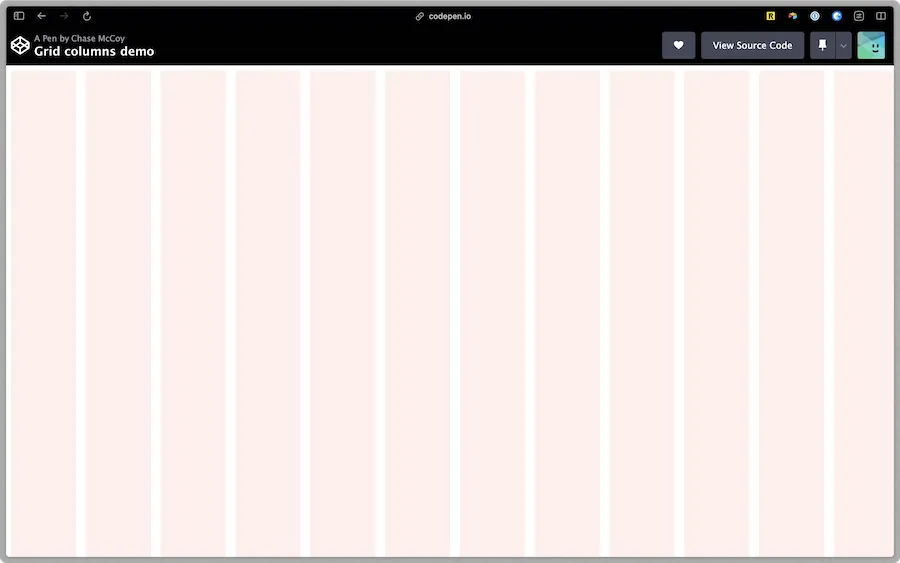
Recently I’ve been working on a project at the day job that requires the use of something akin to layout grids in Figma. I was curious how difficult it would be to recreate this on the web.
It took longer than I’d like to admit to figure out the math, but with a single repeating-linear-gradient we can overlay a representation of our grid onto the page. I whipped up a class for this with support for specifying your own number of columns and gutter width.
In the spirit of blogging the things I want to remember:
Slap that class onto your grid container and presto, you’ve got some rails in place to keep everything lined up nice and neat.
repeating-linear-gradient invokes strange powers
Once again I’m left marveling at the humble power of CSS, and feeling grateful that we live during times when such an expressive yet simple visual language is spoken so ubiquitously.